Weather app
- 4.7
- Rating
- 10.00M
- Installs
- Free
- Price
 Analysis by App-foxy
I tend to judge a weather app by what happens when I am already in a hurry: Can I check the next few hours quickly, understand whether rain is actually approaching, and decide what to wear without sorting through clutter? This app makes a strong case for itself because it combines a straightforward forecast view with radar and map tools in one place. It is free, rated Everyone, and comes from Accurate Weather Forecast & Weather Radar Map, so its appeal is easy to understand: it aims to be a practical daily weather companion rather than a specialist meteorology workstation.
After spending time with it, my overall view is positive but measured. The app is at its best when I want a quick answer supported by visual context. The radar and map elements make the forecast feel more useful than a simple temperature card, while the familiar layout keeps the learning curve low. My main recommendation is to use it as a fast decision-making tool, not as the only source for high-stakes weather planning. That distinction matters if you are preparing for a long trip, outdoor work, severe conditions, or anything where local official alerts should take priority.
What makes this weather app useful in everyday life
I find this app most useful when I treat a weather check as a small decision, not just a glance at the temperature. I start with the day’s outlook, then turn to the map when timing or a nearby shower could change my plans; that keeps the extra detail helpful rather than distracting. This everyday approach also makes it easier to see where the app’s strengths end and which alternatives might suit a different routine.
You May Also Like

 Blood Strike: 2.5 Anniversary
Blood Strike’s Loadouts Turn Every Drop Into a Tactical Gamble
A close look at Blood Strike’s custom loadouts: how fast access to signature weapons reshapes its battle royale rhythm, rewards preparation, and narrows the gap between fights.

 Pandora - Music & Podcasts
Pandora’s Music Is Easy to Start, but Harder to Recover
Pandora’s strength is its low-effort path from a seed to a station. Its weak spot is how much confidence it asks you to place in connection, setup, and quiet recovery.

 8 Ball Pool
 Is Built on Rivalries, Rematches, and Routine
A close look at the rivalries, rematches, shared routines, and unanswered safety questions that turn a quick pool match into a persistent mobile community.

 Samsung Music
’s Quiet Strength Is Playing What You Already Own
Its reach comes less from spectacle than from dependable access to a personal library. That simplicity is both the app’s strongest retention engine and its ceiling.

 AccuWeather: Weather Radar
AccuWeather Review: A Quick, Clear Forecast for Everyday Decisions
For everyday plans, the best forecast is the one you can understand quickly. AccuWeather makes rain timing, radar, and local conditions easy to act on, with a few trade-offs.

 Hill Climb Racing
Why Hill Climb Racing Still Turns Crashes Into One More Run
A tiny car, a bumpy hill and one more upgrade: Hill Climb Racing keeps resurfacing because its simple chaos makes every near-miss feel personal.
More From Our News Desk
View All News


A quick forecast that does more than show the temperature
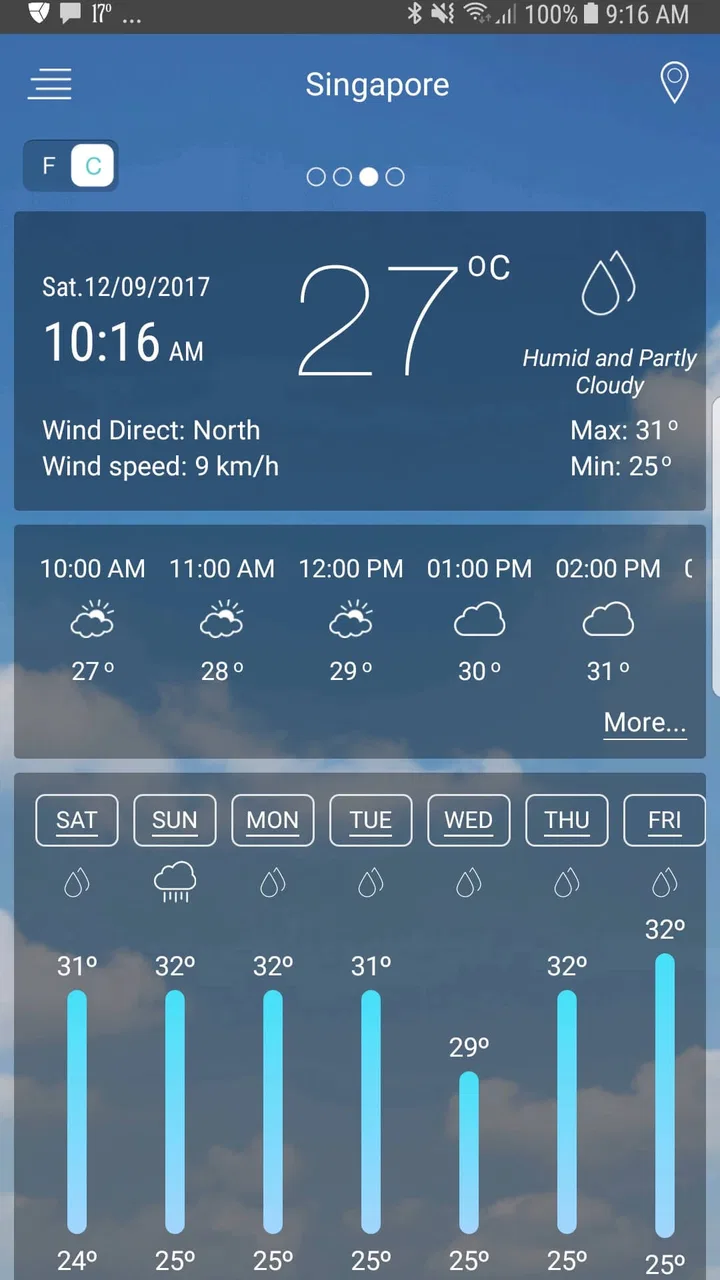
The first thing I appreciate is that the app is built around the questions people actually ask. I usually want to know whether I need an umbrella, whether the morning will be cold enough for a jacket, and if the weather is likely to change before I return home. A basic current-condition display can answer only the first part of that process. The combination of forecast information, weather radar, and a weather map gives me a better way to interpret what is happening around my location.
The distinction between a forecast and a radar view is important. A forecast tells me what the app expects to happen over a period of time. A radar-style map helps me see the movement and concentration of precipitation in relation to where I am. Those are different kinds of information, and having both available reduces the need to jump between separate weather tools. I find that especially helpful on unsettled days when the hourly outlook looks uncertain but the map shows whether a rain band is nearby or still far away.
The app is also approachable for people who do not want to learn technical weather terminology. Its purpose is clear as soon as I open it, and the central information is not buried behind a complicated dashboard. That makes it suitable for a family member who wants dependable daily guidance without adjusting a large collection of specialist settings.
Radar is most valuable when I use it at the right moment
One of the more useful habits I developed with this app is checking the radar immediately before leaving, rather than treating it as a replacement for the forecast. If the hourly outlook suggests scattered showers, the map can help me decide whether I should leave now, wait briefly, or take waterproof clothing. This is more practical than reacting only to the icon shown for the entire hour.
There is a trade-off here. Radar imagery can look persuasive, but it does not guarantee that every drop will fall exactly where the display suggests. Small showers can develop or weaken, and the farther ahead I look, the less confidently I treat the picture. I use the map for short-term context and the forecast for broader planning. That workflow is one of the app’s real strengths because it encourages me to compare two views instead of trusting one symbol.
For commuting, school runs, dog walks, and short errands, this is a meaningful advantage over a minimal weather widget. A widget is excellent for instant temperature checks, but it rarely gives the same sense of what is moving toward a location. When I have only a few minutes to decide, the map adds useful context without requiring a separate service.
A realistic morning-to-evening scenario
Imagine a weekday morning with a dry start and a forecast that becomes wetter later. I would first check the current conditions and the hourly outlook while getting ready. If I am walking to work, I would then open the radar to see whether the approaching precipitation is a broad area or a narrow patch. That difference affects whether I carry a compact umbrella, wear a waterproof layer, or simply accept that I may need to wait before leaving.
At lunchtime, I would check again rather than relying on the morning decision. Weather changes are easier to handle when I make several small checks instead of expecting one forecast to remain perfect all day. On the journey home, the map becomes useful once more because it helps me judge whether the rain on the forecast is already nearby or likely to arrive later.
This is where I think the app earns its place. It does not need to be spectacular to be useful; it needs to reduce small daily uncertainties. The combination of an easy forecast and a visual map supports exactly that kind of repeated, low-effort checking.
Useful for planning, but not a substitute for official warnings
I would use this app to choose clothing, plan errands, adjust a walk, or decide whether an outdoor appointment needs a backup plan. I would not rely on it alone for dangerous storms, flooding, wildfire conditions, travel disruption, or emergency decisions. In those situations, local authorities and official warning services are more important than any general-purpose weather application.
That is not a criticism unique to this product. It is a sensible boundary for consumer weather tools. The app is designed for accessible forecasts and map-based awareness, not for replacing public safety communication. Keeping that boundary in mind makes the experience more reliable because I use the app for the kind of decisions it handles well.
How the app compares with familiar alternatives
The usual alternatives fall into a few groups. A phone’s built-in weather panel is convenient and often enough for checking the current temperature. A search engine is useful when I want a quick answer without opening an app. Specialist radar services can be better for people who closely follow storm cells, precipitation movement, or local atmospheric detail. This app sits between those options.
Compared with a basic built-in panel, it offers a more deliberate weather-checking experience because radar and map information are part of the same destination. Compared with a specialist service, it feels less intimidating and more suitable for ordinary daily use. I would choose a specialist tool if I needed advanced interpretation or very detailed storm tracking. I would choose this app when I wanted more than a widget but less complexity than a professional-style weather dashboard.
That middle position is the clearest reason to try it. It is not merely a decorative temperature display, yet it does not demand that I become a weather enthusiast before I can understand it. For many people, that balance is more valuable than having every possible technical layer.
Small habits that improve the experience
I recommend checking the app at two different scales. First, look at the broader forecast to understand the shape of the day. Then use the radar only when timing matters. Opening the map for every casual temperature check adds effort without adding much insight, while ignoring it on a rainy day wastes one of the app’s most useful tools.
I also pay attention to the difference between a low chance of precipitation and a nearby area of rain. A percentage alone can feel abstract. The map gives that number a geographical context, although I still treat it as guidance rather than a promise. This is a subtle but important improvement over reading a forecast as a series of isolated icons.
For travel, I would check the destination separately from the departure point and compare the outlook before packing. A mild starting location does not tell me what the afternoon will feel like elsewhere. This simple two-location routine is particularly useful for day trips and commutes across a large urban area, where conditions can vary noticeably.
The meaningful limitations I noticed
The app’s broad appeal also points to its main weakness: people who want deep customization or highly technical information may find the experience too general. The forecast and map combination is convenient, but convenience usually means some specialist detail is less prominent. If I were tracking a developing storm in depth or making a professional outdoor decision, I would want a service built specifically around that task.
Radar can also create a false sense of precision. The visual presentation is easy to understand, but easy-to-read graphics can encourage overconfidence. I have to remember that a moving weather system is not a fixed appointment. A map that looks clear now may not describe conditions later, and a narrow shower line can behave differently from what I expect.
Another limitation is that people who want a completely passive experience may prefer a simple widget or notification-focused service. This app rewards opening it and looking at the information. That is a good thing when I want context, but it may feel like extra work for someone who only wants the current temperature displayed on a home screen.
There is also a practical question about phone compatibility. The app supports devices running Android 5.0 or later, which covers a wide range of phones, but users on older hardware should still consider how comfortably the interface runs on their particular device. The current version is 7.6, so anyone installing it should keep the app updated through the normal store process to receive the latest available improvements for their platform.
Who should install it?
I think it is a good fit for people who check the weather several times a day and want more context than a single number. Commuters, parents planning school journeys, walkers, cyclists, casual travelers, and anyone who likes seeing precipitation on a map will find a clear reason to use it. It is also a sensible choice for someone moving from a very basic weather widget and wanting a richer view without entering a complicated technical environment.
The app’s popularity supports that everyday positioning. It has passed ten million installs and holds a 4.7 average from roughly 230 thousand ratings, which suggests that its simple, accessible approach connects with a large audience. Those figures do not prove that every forecast will suit every location, but they do show that the app has become a familiar option for people looking for general weather information.
I would be more cautious about recommending it to meteorology hobbyists, professional outdoor crews, or users whose main need is emergency-grade alerting. Those users may be better served by a specialized radar platform, a local government warning service, or a tool designed around the exact region and weather risks they monitor. The app can still be a useful secondary view, but I would not make it their only instrument.
Cost, accessibility, and the everyday trade-off
The app is free, which makes experimenting with it easy. There is no purchase decision to make before I can decide whether its forecast layout and map tools fit my routine. That matters for casual users who may use weather information only a few times each week, as well as households that want a shared, approachable option.
Its Everyone content rating also makes it suitable for a broad audience. I would still encourage parents to explain that a weather app is a planning aid, not a guarantee, especially when children are using it to decide whether conditions are safe for outdoor activities.
The trade-off for free access is that I judge the app mainly by clarity and usefulness rather than expecting a deeply specialized service. If the information is easy to scan and the map helps me make better short-term choices, it has done its job. If I need detailed scientific analysis, I should look elsewhere instead of expecting this app to become something it was not designed to be.
My final recommendation
Weather is a practical, approachable forecast app with a genuinely useful radar-and-map layer. I like it because it supports a better routine than simply glancing at a temperature: I can check the day ahead, inspect what is moving nearby, and make a more informed decision about leaving home. The developer, Accurate Weather Forecast & Weather Radar Map, has positioned it as an accessible weather tool, and that focus comes through in the experience.
My recommendation is strongest for everyday users who want a free weather app that sits between a basic phone widget and a technical radar service. Use the forecast for broad planning, use the map for near-term timing, and verify serious weather concerns with official local sources. With those expectations, I find it useful, easy to return to, and more informative than a bare current-conditions screen.
It is not the perfect choice for everyone. Users seeking advanced meteorological controls, specialist storm analysis, or a fully passive notification experience may prefer another category of tool. For ordinary commuting, errands, walks, and day-to-day decisions, though, I would comfortably recommend giving it a try. Its strongest quality is not that it promises certainty; it is that it gives me enough context to make sensible choices quickly.
FAQs for Weather app
01What features does the Weather app offer?
The Weather app provides real-time weather updates, hourly and weekly forecasts, severe weather alerts, and radar maps. It also includes features like sunrise and sunset times, humidity levels, and wind speeds. Users can customize notifications and access detailed weather statistics for multiple locations worldwide.
02Is the Weather app available for both Android and iOS?
Yes, the Weather app is available for download on both Android and iOS platforms. Users can find it in the Google Play Store for Android devices and the Apple App Store for iOS devices. Make sure your device meets the minimum system requirements for optimal performance.
03Does the Weather app require an internet connection to function?
The Weather app requires an internet connection to provide real-time updates and accurate forecasts. While some features like saved locations and basic forecast information can be accessed offline, the most current weather data and radar maps need an active connection to update.
04Is there a subscription fee for using the Weather app?
The Weather app is free to download and use, offering basic weather information and alerts. However, there is a premium subscription option that provides additional features such as ad-free usage, advanced radar tools, and extended forecast details. Users can choose to subscribe on a monthly or yearly basis.
05How accurate is the Weather app in predicting weather conditions?
The Weather app uses data from trusted meteorological sources and employs advanced algorithms to provide accurate forecasts. While no weather prediction can be 100% reliable, the app is generally precise in short-term forecasts. Users are advised to check for updates regularly, especially in cases of severe weather.
Pros
- Accurate real-time weather updates.
- User-friendly interface for all ages.
- Customizable alerts for severe weather.
- Detailed 7-day forecast view.
- Supports multiple locations tracking.
Cons
- Ads can be intrusive at times.
- Limited features in free version.
- Occasional lag on older devices.
- Requires internet for full functionality.
- Battery usage can be high.

Weather app
Gallery